Google is laying down the law on company names on Google Business Profile
Originally published
- Multi-Location
- Google Business Profile
- How-to Guides
How your company is named on Google Business Profile matters, and Google is taking action
Don’t reinvent the wheel!
Wrong, and here’s why. Google automatically shows the locations that are nearest to the customer when they do a google search or maps search. Generally speaking, the consumer could care less which store is the closest unless the offering differs drastically from store to store. Additionally, the address is always displayed in the results making the additional information redundant.
You’re sabotaging your own insights!
When you add location-specific words to your business name (like city names or neighbourhood tags), it becomes impossible to compare performance across locations in Google Business Profile Insights. Keep your naming consistent so you can measure what is actually working.
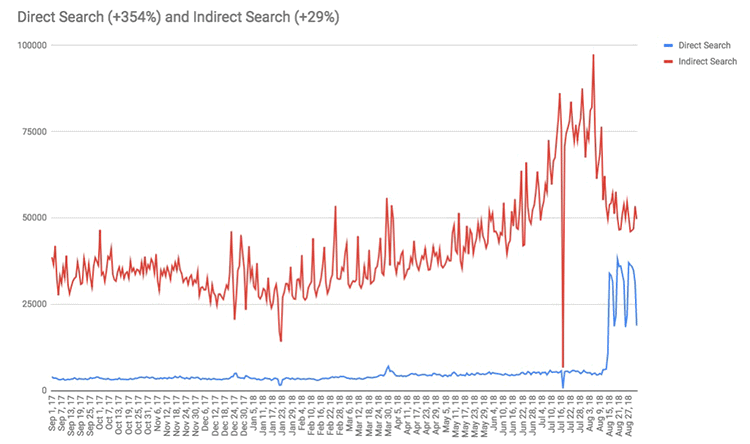
Google takes over
If you have any questions on the subject or want help making sure your company is listed correctly, just give us a shout at hello@pinmeto.com! A listings management tool can help you keep naming consistent and compliant across all your locations.
Recommended Articles
How to Respond to Google Reviews at Scale Without Sounding Like a Robot
Manage review responses across dozens of locations without losing authenticity. Templates, timing, and a workflow for enterprise-scale review management.
Daniel Melkersson
Google Business Profile Best Practices: The 2026 Playbook
Master Google Business Profile best practices in 2026 with data-backed strategies for multi-location brands to boost local visibility and drive conversions.
Astghik Nikoghosyan
Understanding Google Local Algorithm for Multi-Location Brands
Boost your multi-location brand’s visibility by mastering Google’s local algorithm. Learn actionable tips on optimizing your profile, reviews, and local SEO strategy.
Lily AdamyanFrequently Asked Questions
What are Google's naming guidelines for businesses on Google Business Profile?
What happens if you add keywords to your Google Business Profile name?
How should multi-location brands name their locations on Google?
Subscribe to Our Newsletter
Get local SEO tips, product updates, and marketing insights for multi-location brands delivered to your inbox.
Ready to boost your local visibility?
See how PinMeTo helps multi-location brands manage listings, reviews, and local SEO at scale.
Book a Demo