 Ehsan Mousavi
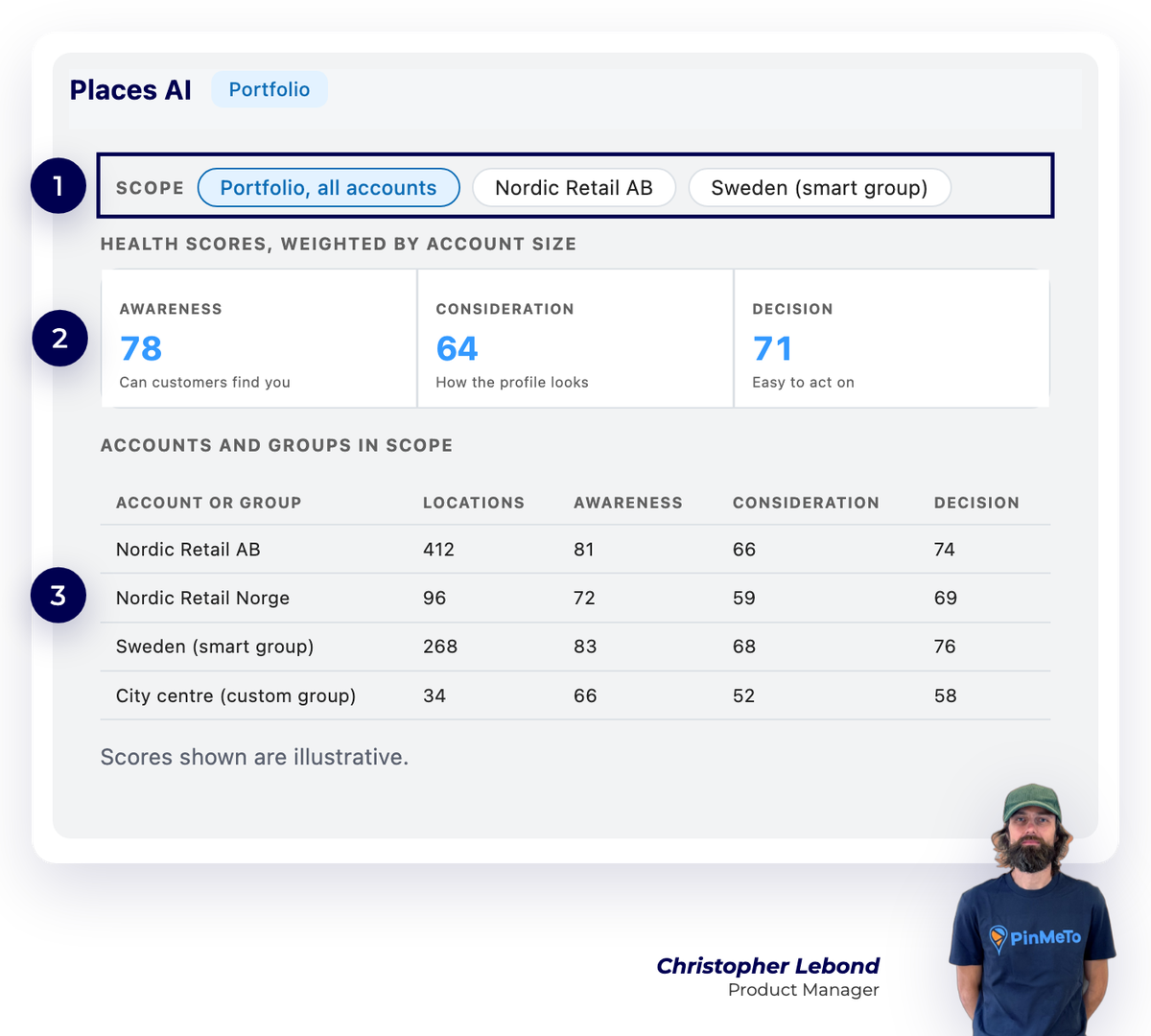
Portfolio View opens Places AI on every account you can reach, with the accounts and groups sitting next to each other and a scope selector to drop into any one of them. Key metrics, health scores and recommendations are shown as one overview for the whole portfolio, and it is already on for every account.
Until now, Places AI showed one account at a time. Anyone responsible for several switched between them in the account picker and built the comparison themselves, usually in a spreadsheet. That comparison is now the first thing you see.
Multi-account customers needed to do the aggregation themselves, in a spreadsheet. The portfolio view gives them the comparison instead of the homework.
 Christopher Lebond, Product Manager
At a glance
- One dashboard across every account and site you have access to.
- A scope selector narrows from the whole portfolio to a single account, or to a group inside it.
- Health scores are weighted by account size, so accounts and groups compare fairly rather than arithmetically.
- Group-level breakdowns for everyone: Smart groups by country, which you activate, or Custom groups you define.
- The metrics behind the scores moved from daily to weekly aggregation.
What you get back
Two things, and the second is the one people underestimate.
The first is that you stop switching accounts in the account picker to see how each one is doing. The scope selector does it, and the whole portfolio is the default. The second is comparison. When four accounts are side by side and the scores are weighted so the comparison is fair, the question stops being “how are we doing” and becomes “why is Norway behind Sweden”. That question has an answer, and the answer is a list of actions.
What changes if you manage more than one account?
The portfolio scope aggregates every account you have access to into one view, and puts them next to each other so you can see which one leads and which one needs attention.
Access decides the boundary, not a setting. Your portfolio is exactly the accounts and sites your user can already reach, which also means two people at the same brand can see different portfolios, quite correctly.
What changes if you manage one?
Your data does not move. What you gain is a way to group your business into relevant units and compare them. Smart groups are built for you by country, so a Nordic brand gets Sweden, Norway, Denmark and Finland ready to activate. Custom groups are yours to define, which is where a region, a franchise cluster or the city-centre sites tend to end up.
Why are the scores weighted?
Because an unweighted average across accounts of different sizes is close to meaningless. Twelve immaculate locations and four hundred neglected ones should not produce a comfortable middle. Weighting by account size means the portfolio score reflects where your locations actually are, and lets a large account and a small one be judged on the same terms rather than the same arithmetic.
Where the work happens
The portfolio is where you compare and decide, and the account is where you act, with every tool you already use one click away:
- See which account needs you, then go there. The scope selector takes you into it, and replying, editing, exporting and sharing work exactly as before.
- Ask the AI chat about the whole portfolio. With the AI Agent enabled on every account in scope, it answers questions like which brand is performing best. If one account does not have it yet, narrow the scope or enable it there.
- Benchmarks stay at account level for now, comparing each account to its peer group. Portfolio-level benchmarks and drill-down to a single location are next.
Did the numbers change?
The measurements did not. To support the larger view, the metrics behind the scores now roll up weekly rather than daily, so a number you noted before July may differ slightly from the same metric today. Same measurement, longer period.
Where to start
Open Places AI and leave the scope on Portfolio for a week rather than dropping straight into the account you know best. The comparison is the new information, and it only shows up if you look at the accounts together first.
Product Marketing Manager
Ehsan is the Product Marketing Manager at PinMeTo. He has spent his career in product strategy and go-to-market across SaaS and AI companies, leading launches and growth marketing that tie new features to real customer needs. At PinMeTo he writes about product releases, new features, and platform updates, covering what's changing and how multi-location brands can put it to work.
Frequently Asked Questions
What changes if we only have one account?
Why are the health scores weighted by account size?
Can we reply to reviews or edit listings from the portfolio view?
Does the AI chat work across the whole portfolio?
Did the underlying numbers change?
Subscribe to Our Newsletter
Get local SEO tips, product updates, and marketing insights for multi-location brands delivered to your inbox.
Want to see it on your locations?
See how PinMeTo helps multi-location brands manage listings, reviews, and local search at scale.
Book a Demo