Location Reports & Presence Board-ready location reports and a web presence score, asked for in plain words in your AI assistant
Most location reporting still ends in a spreadsheet. Someone exports the numbers, pastes them into last quarter’s deck, fixes the charts, and writes the commentary the night before the review. Checking whether customers can actually find each location on search, maps and AI answers is a separate job again, and it rarely gets done at all.
Location Reports & Presence moves both jobs into the AI assistant you already use. It is a plugin for Claude Desktop, Claude Code and Codex in the ChatGPT desktop app, and it contains two skills that work from your own PinMeTo data. Ask for a Q3 report and you get a branded PDF or PowerPoint. Ask for a presence scan of your website and you get a score out of 100 with a ranked list of what to fix.
At a glance
- Location Reports builds monthly, quarterly, half-year or annual reports as PDF or PowerPoint, in PinMeTo branding.
- Web Presence scores how findable your locations are across search, maps, AI answers and AI agents, and tells you what to fix first.
- Both compare the live web with the location data you manage in PinMeTo.
- In Claude Desktop and Claude Code, one install from the PinMeTo marketplace adds both skills.
- Read-only throughout. The plugin never changes your listings or your PinMeTo data.
What does Location Reports produce?
A report you can take into a board meeting without rebuilding it first. You name the period, and the skill pulls the numbers from Google Business Profile, Facebook and Apple Maps: views, searches, direction requests, calls, ratings, review themes, and the keywords customers used to find you. Each figure is compared with the previous period or the same period last year, and the report closes with recommendations drawn from the data.
The request can be as short as “Create a Q3 2026 report as PDF and PowerPoint” or “Make an annual report for 2025 for our board meeting”. Mentioning the audience helps, because a board summary and a team review need different levels of detail.
Google’s metrics arrive with a delay of roughly ten days, so a report for last month is most complete when you run it once the month has settled.
What does the Web Presence scan check?
How easily a customer can find your locations today, in the four places they now look. You ask your assistant to “check our web presence for brand.com”, and the scan reads your store locator and location pages, looks up your listings on Google, Apple and Bing Maps in a browser the way a customer sees them, and compares what it finds with the location data in PinMeTo.
Search covers whether Google can crawl your location pages, tell them apart, read their structured data and load them quickly on a phone. Maps covers whether each listing exists, is connected through PinMeTo, and agrees with your website on name, address, phone, pin and hours. AI answers covers whether ChatGPT, Claude, Gemini and Perplexity can quote your own pages instead of relying on third-party summaries, which is the ground generative engine optimization works on. AI agents covers whether an agent booking or shopping for a customer can work out what your site offers and what it is allowed to do there.
Most of what the scan finds comes down to the same fact being different in two places: a phone number on the website that does not match the Google listing, a store page missing from the sitemap, an Apple listing nobody connected.
How is the score worked out?
Every check passes, fails, or is marked as not measured when the scan had no way to look, for example behind a consent wall. The four areas are weighted into one score out of 100: Search 30, Maps 30, AI answers 25 and AI agents 15, with a grade from A to F.
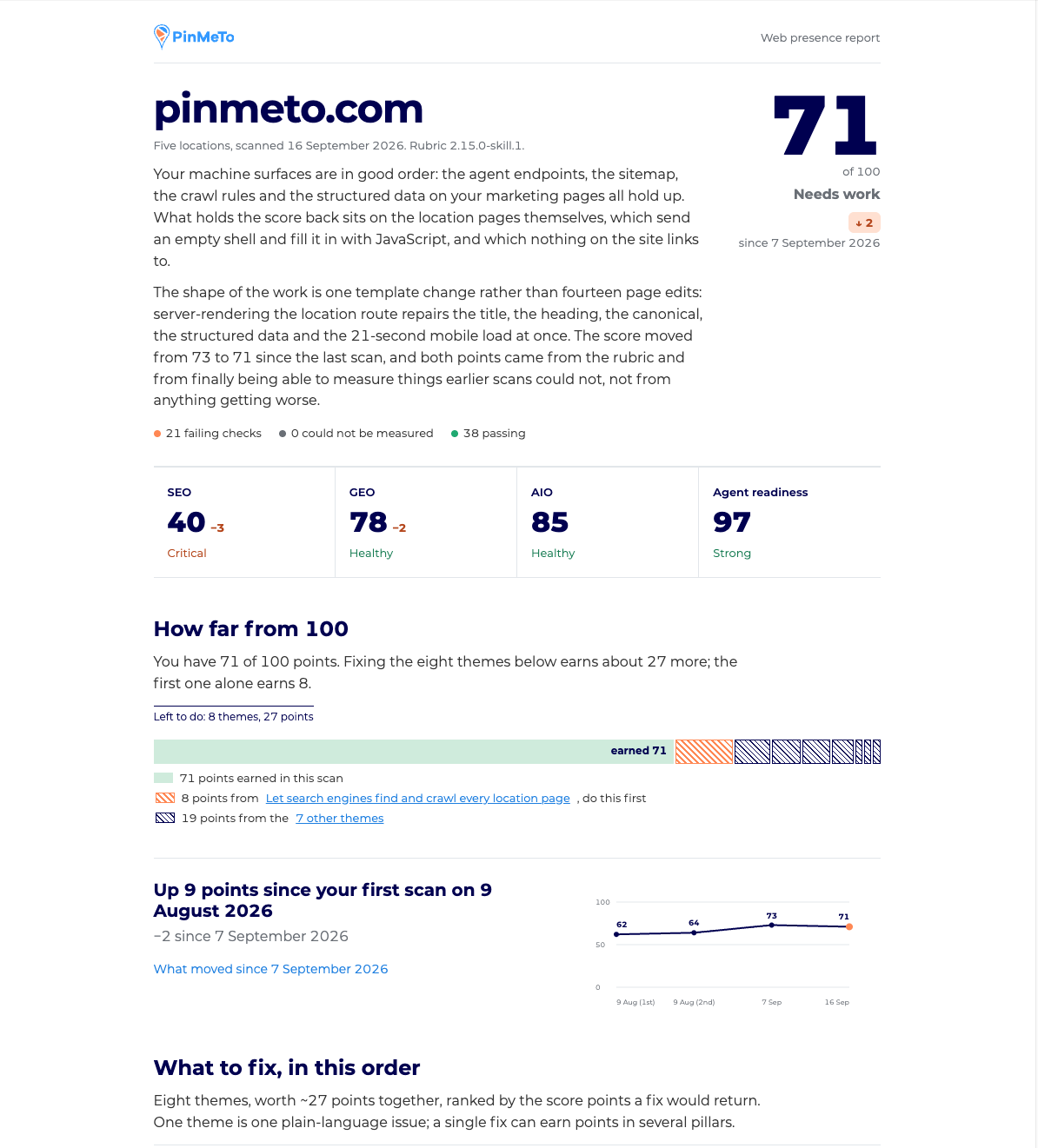
The report leads with that score and then lists Themes, ranked by what fixing each one is worth. A Theme is one plain-language issue that one fix and one owner resolve, such as “Same name, address, phone and pin everywhere”. Each opens into a brief with the evidence, the steps, and a prompt your developer or coding agent can paste straight in. Some Themes are not code at all, like connecting a listing in PinMeTo.
Run the scan again next month and the same report shows what moved, and whether a change came from your site or from an update to the scoring rules. The scan works on a sample of your locations and names the ones it checked. It can also be scoped to one country or region.
What do you need to get started?
Three things: your PinMeTo Account ID, App ID and App Secret from Account Settings > API, one of the supported assistants, and for the map checks a browser tool in that assistant. Setup is two steps. You install the PinMeTo Location MCP connection with your credentials, then add the skills. In Claude that means adding the plugin from the PinMeTo marketplace; in Codex you install them from the Location Reports and Web Presence repositories. The Help Center guide walks through both for each assistant.
To confirm it works, ask your assistant to “show me one of my locations”. If a location comes back, the connection is live.
What should you know before relying on it?
Reports and scans are written by AI from your PinMeTo data and from public signals, so they can contain mistakes. Check a finding before you act on it, especially one that would send a developer off to change a site.
Map listings are read at a single point in time and can differ between viewers, so the report records the date and what was on screen. Your data is processed by the AI provider you choose, on their terms, not by PinMeTo. And ChatGPT on the web is not supported; the desktop app is.
Where to start
Run the presence scan on your own domain before anything else. The first Theme on the list is usually a mismatch between your website and your listings, and it is usually quicker to fix than anyone expected.
Availability
Talk to your PinMeTo contact about access. The plugin needs API credentials for your PinMeTo account, found under Account Settings > API.

Co-founder & Head of AI
Marcus is the Co-founder and Head of AI at PinMeTo. He writes about artificial intelligence, machine learning applications for multi-location businesses, and how AI-driven insights can transform local marketing and brand management at scale.
Frequently Asked Questions
Which AI assistants does the plugin work with?
Can the plugin change our listings or our PinMeTo data?
Who processes our data when we run a report?
Is the Web Presence score a ranking guarantee?
Why does the scan need a browser tool?
Do we have to reinstall when the skills improve?
Subscribe to Our Newsletter
Get local SEO tips, product updates, and marketing insights for multi-location brands delivered to your inbox.
Want to see it on your locations?
See how PinMeTo helps multi-location brands manage listings, reviews, and local search at scale.
Book a Demo