PinMeTo - How & why to set special opening hours
Originally published
- Product Updates
Flowers for Valentine’s Day, bubbly for New Year’s, and candy for Halloween are all must-have items. As last-minute customers hunt for holiday necessities, make sure they trust your hours - whether you’re open or not - so they don’t lose faith in your brand.
Why Set Special Opening Hours?
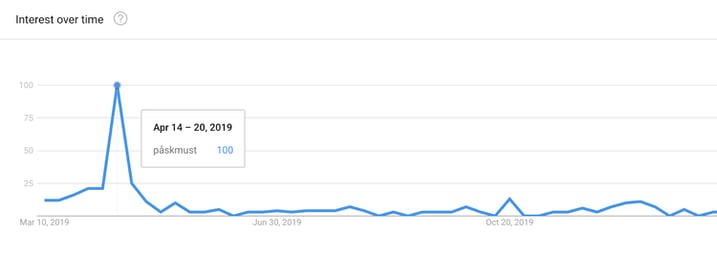
But it’s just as important to let your customers know if you aren’t open, because there are few things as frustrating as showing up to a business that claims to be open and finding it closed.
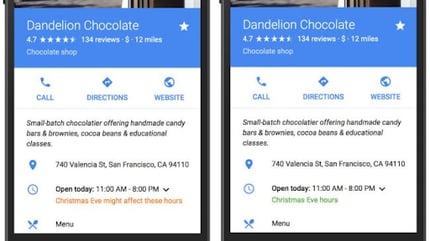
In the image on the right, the green text saying “Christmas Eve hours” shows that the business has updated their info, so the person seeing that message can feel confident that the hours are accurate.
How to Set Special Opening Hours
The easiest way to set special open hours across many locations is by using a listings management service, like PinMeTo Listings platform, which gives multi-location brands a one-stop dashboard for setting special hours across all their locations. Once you set special opening hours in a listings management service, those changes will then be made across all the networks connected to that service (PinMeTo includes Google, Yelp, Bing, and many other major networks).

Recommended Articles
What Is MCP? How AI Agents Get Direct Access to Your Location Data
MCP lets AI agents connect directly to your location data. Learn what Model Context Protocol means for multi-location marketing and how PinMeTo's MCP connector works.
PinMeTo
Introducing Places AI: A New Starting Point for Local Presence
Discover Places AI by PinMeTo — an AI-powered tool that helps multi-location brands manage local presence, boost visibility, and drive results.
Lily Adamyan
Apple Business in 2026: What Brands Need to Know
Master Apple Business in 2026. Learn how to manage Place Cards, sync location data at scale, and use new features to drive local ROI.
Lily AdamyanSubscribe to Our Newsletter
Get local SEO tips, product updates, and marketing insights for multi-location brands delivered to your inbox.
Ready to boost your local visibility?
See how PinMeTo helps multi-location brands manage listings, reviews, and local SEO at scale.
Book a Demo