Apple Business Connect Is Now Apple Business: What to Know
Originally published
- Local SEO
- Multi-Location
- Apple Maps
Apple just made its biggest move in the business tools space in years. On March 24, 2026, the company announced Apple Business, a unified platform that combines three previously separate services into one: Apple Business Essentials, Apple Business Manager, and Apple Business Connect.
For multi-location brands, this is not just a rebrand. It is a signal that Apple is getting serious about competing for the attention of businesses that manage their customer-facing presence across platforms. And the timing is now: Apple Business launched April 14, 2026, in more than 200 countries and regions.
Here is what is changing, what stays the same, and what your team should be thinking about right now.

What Is Apple Business?
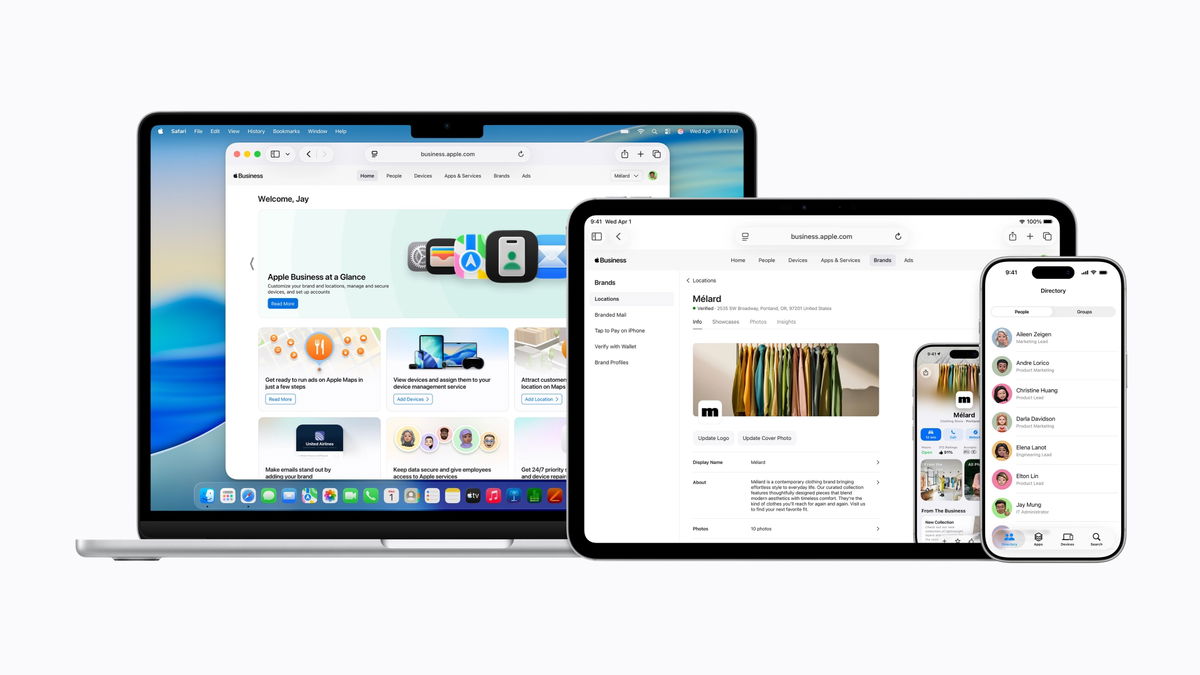
Apple Business is a new all-in-one platform designed to give companies the tools to manage devices, reach customers, equip employees with the right apps, and access expert support, all from a single place.
Think of it as Apple consolidating the fragmented business toolset it has built over the past several years. Instead of managing device configurations in one portal, customer-facing listings in another, and email or domain settings in a third, everything now lives under one roof.
According to Apple’s announcement, the platform includes built-in mobile device management with “Blueprints” for quickly configuring employee groups, device settings, security, and apps. It also includes business email, calendar, and directory services with custom domain support.
For brands focused on local presence, the most relevant piece is the customer reach layer: Apple Business will help companies grow visibility across Apple Maps, Mail, Wallet, Siri, and more.
What Happens to Apple Business Connect?
This is the key question for any brand that has invested time in building out its Apple Business Connect profiles. The short answer: your data migrates automatically.
Apple has confirmed that existing Business Connect data, including claimed locations, place card information, photos, organization details, and account settings, will transfer to Apple Business at launch (Apple Newsroom, March 2026).
Apple Business Essentials, Apple Business Manager, and Apple Business Connect are no longer available as separate services now that Apple Business is live.
In practice, this means the work your team has done to claim and optimize Apple Business Connect profiles is not lost. It becomes the foundation of your presence inside the new platform. If anything, brands that have already invested in Apple Business Connect are better positioned than those starting from scratch.
A New Advertising Channel: Ads on Apple Maps
One of the most significant additions in the announcement is the introduction of advertising on Apple Maps. Beginning this summer in the U.S. and Canada, businesses will be able to create ads on Maps directly through Apple Business.
This is a notable shift. Apple Maps has been an ad-free environment since its launch. The introduction of paid placement gives multi-location brands a new channel to compete for visibility in a high-intent context: people actively searching for nearby businesses.
The details on ad formats, pricing, and targeting are still emerging, but the direction is clear. Brands that are already managing their Apple presence with accurate and complete location data will be in a stronger position when this ad product rolls out. Accurate listings are the foundation of effective local ads, regardless of platform.
What This Means for Multi-Location Brands
For brands managing dozens or hundreds of locations, the consolidation into Apple Business has a few practical implications worth considering.
First, the barrier to entry just got lower. Smaller businesses that were not going to set up three separate Apple portals might now engage with one unified dashboard. That means more competition for local visibility on Apple surfaces, which makes it even more important for established brands to keep their listing data current and complete.
Second, Apple is clearly signaling long-term commitment to business tools. The combination of device management, employee tools, and customer-facing features in a single platform suggests Apple sees this as a growth area, not a side project. For brands evaluating where to invest their local presence efforts, Apple’s trajectory is worth watching.
Third, if your team had not yet claimed all locations on Apple Business Connect before the migration, it is not too late. You can still claim and manage your locations through the new Apple Business platform. Starting with clean, verified data remains essential.

What Should You Do Now?
The transition happened automatically on April 14, but there are still steps to take. Here is what we recommend:
Audit your Apple Business profiles. Verify that all locations are claimed, that business information (name, address, phone, hours) is accurate, and that each profile has quality photos and up-to-date categories. Check that everything transferred correctly after the migration.
Review your team access. Confirm which team members have access, what roles they hold, and that your organization structure is configured correctly in Apple Business. Platform migrations can sometimes reset permissions or change access flows.
Stay informed on Apple Maps ads. If your brand runs Google Ads or invests in local search advertising, start thinking about how Apple Maps ads might fit into your channel strategy this summer (available in the US and Canada).
Keep managing your profiles actively. The consolidation is complete, but your local presence management should continue as usual. Keep publishing updates, responding to reviews, and maintaining accuracy across all your locations.
The Bigger Picture
Apple Business is a clear statement from Apple that it wants to be a one-stop shop for businesses of all sizes. For multi-location brands, the most immediate impact is on local presence management: the tools you have been using in Apple Business Connect are not going away, they are becoming part of something larger.
The real question is whether your brand is treating Apple as a secondary platform or a strategic one. With over 1 billion active devices, a growing Maps user base, and now paid advertising on the horizon, the case for investing in your Apple presence has never been stronger. PinMeTo’s direct integration with Apple Business makes it easy to manage your Apple listings alongside Google and 100+ other platforms from a single dashboard.
Get started for free by registering for Apple Business and claiming your location.
Sources and References
Apple Newsroom: Introducing Apple Business - Official announcement, March 24, 2026
Apple Business - Apple Business platform
MacRumors: Apple Unveils ‘Apple Business’ All-in-One Platform - Industry coverage of the announcement

Recommended Articles
Apple Business: Driving Conversions on the Map
Apple Maps is the default on every iPhone, and claimed businesses get 30% more views. Here's why multi-location brands need to make Apple Business part of their operating model.
Björn Handell
What Is Local Listing Management? A 2026 Guide
Local listing management keeps your business details accurate across Google, Apple Maps, and directories. Learn what it is, why it matters, and how to do it at scale.
Björn Handell
What Meta's Muse AI Agent Means for Your Location Data
Meta's Muse is the fastest-downloaded AI agent yet, and it already trips over stale local data. What Muse, Overture Maps, and open POI data mean for multi-location brands.
Marcus OlssonFrequently Asked Questions
What is Apple Business?
What happens to Apple Business Connect?
Will Apple Maps have ads?
What should multi-location brands do now?
Is existing Apple Business Connect data lost in the migration?
Subscribe to Our Newsletter
Get local SEO tips, product updates, and marketing insights for multi-location brands delivered to your inbox.
Ready to boost your local visibility?
See how PinMeTo helps multi-location brands manage listings, reviews, and local SEO at scale.
Book a Demo