Locator & Local Pages Gives every location its own page on your website
 Ehsan Mousavi
Updated
Locator & Local Pages adds a searchable store locator and a dedicated page for every location to your website. Both use the location data you already manage in PinMeTo, so your team keeps website details and network listings consistent from one place.
It is also the one local surface you own. A customer looking for “store in Malmö” can land on a page you control, not only on a profile a network controls.
At a glance
- A Locator your visitors search by address or city, with results ranked by distance, an adjustable radius, and the map and list side by side.
- A Local Page for every location at its own URL: opening hours including special hours, phone, email, address, an About section, directions and a map.
- Everything reads from Listings, so a change in PinMeTo reaches your website without a second update.
- Each page carries a title, description, canonical URL, Open Graph tags and LocalBusiness structured data.
- Your brand: font, colours and pin colour from Account Settings, with a live preview.
- Your own content, added in July 2026: a text custom field as a subheader under the name, and another as a page footer.
- Your webmaster adds two small snippets and a URL rewrite rule once. PinMeTo hosts the widgets after that.
What you get back
One fewer place to keep location data correct, and a page for every location on a domain you control.
Until now a brand’s website usually had a single “find us” page, and the detail about each location lived on the networks. Now every location has a page of its own that sends the visitor straight to directions, a call or an email.
What is in the Locator?
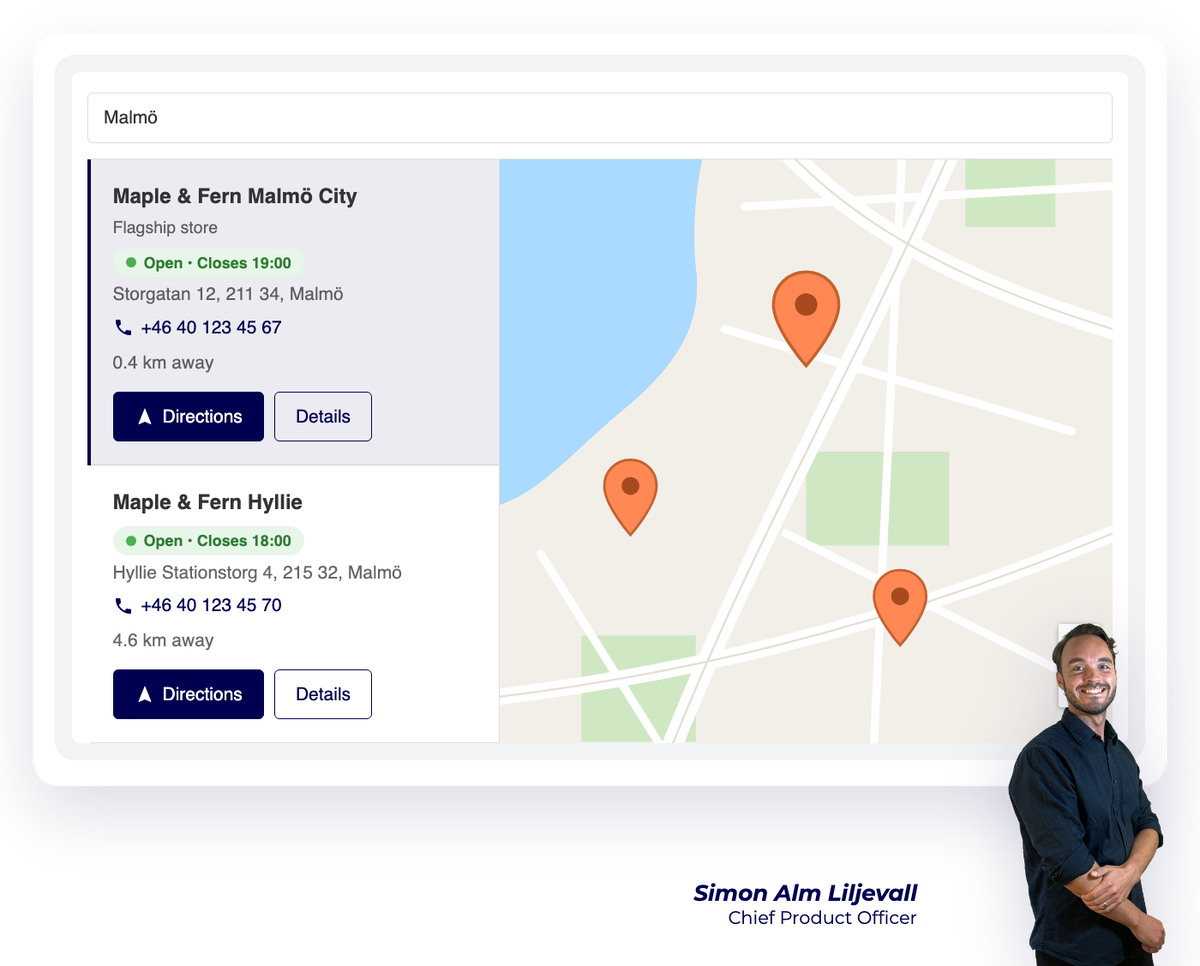
A search box and a map, built for the way people actually look for a store. Visitors type an address or a city and see nearby locations ranked by distance, or allow location access and get the closest ones straight away. They can widen or narrow the radius, in kilometres or miles depending on their browser, and switch between the list and the full map. On a desktop the list and the map sit side by side; on a phone they stack.
Each result card shows the location’s name, the subheader if you use one, the address, whether it is open now, and links to directions and to the location’s own page.
What is on a Local Page?
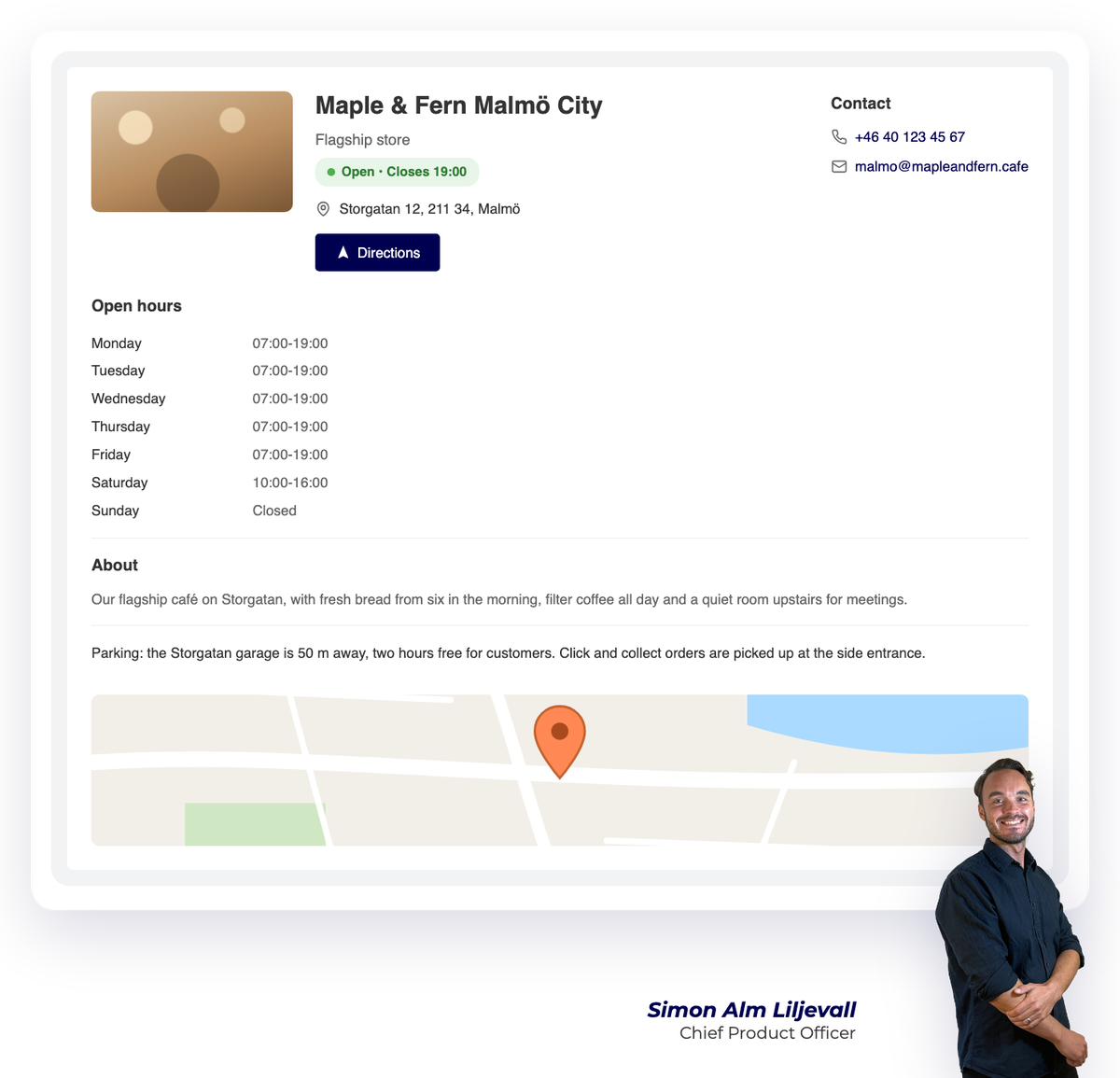
Everything a customer wants before choosing a location, at a URL of its own, such as yoursite.com/locations/store-name:
- Regular and special opening hours, shown clearly.
- Phone, email and the physical address.
- An About section, from the location’s long description in Listings.
- Directions, which opens Google Maps with the location pre-filled.
- A map of the location’s position, and the Google cover image if you choose to show it.
- The subheader under the name and, at the bottom above the map, the page footer, both from your own custom fields.
Because the page has its own URL, it can be shared and linked from a campaign.
How does it stay in sync?
The Locator and the Local Pages read from your PinMeTo Listings data, the same data PinMeTo publishes to Google, Apple, Facebook and the rest. Change the hours for a public holiday, correct a phone number, update a description or swap a cover image in PinMeTo, and the website follows within minutes. There is no export, no import and no second place where a location can quietly go stale.
What do search engines get?
Each Local Page has its own URL. When the page loads, it sets the page title and description, a canonical URL, Open Graph tags for sharing, and LocalBusiness structured data with the business name, address, opening hours, contact details and coordinates.
That gives search engines and AI assistants consistent, structured information about each location, which supports discovery. It does not guarantee a ranking. The tags are added by JavaScript, so a crawler has to render the page to see them, and not every crawler does.
Make it yours
Font, background colour, text colour, accent colour, accent text colour and pin colour are set in Account Settings, with a preview next to the settings so you see the Locator and a Local Page change as you go.
The map is optional. When you want it, you add your own Google Maps API key. The key needs a Google Cloud project with billing enabled, and Google bills map usage to you directly, separately from PinMeTo.
The widget’s labels and buttons come in English, Swedish, French, German, Dutch, Polish, Spanish, Finnish and Portuguese, chosen from your settings or from the language of the page they sit on. A multi-language site embeds one Locator per language path, and each language version of a location page gets its own URL.
Your own content on every page
Added in July 2026. The custom fields you already keep per location can show on the Locator and on every Local Page, in two places: a short label under the location name, and a longer block at the bottom of the page above the map. “Flagship store” and “Appointments only” belong in the first; a parking note or a short FAQ in the second.
Text fields only, as plain text, one field per placement applied across all locations. The field is published through the Public API before it can be selected, so publish only what you are happy for anyone to read. PinMeTo support creates the field if you do not have it yet.
How does it get onto your website?
Three steps, and only the last one is technical. PinMeTo sets up the product and the settings with you. You and your webmaster choose the path on your site where the locations will live, such as /locations. Your webmaster then adds the two widget snippets and a URL rewrite rule so that every location page resolves under that path, with one rule per language path on a multi-language site.
PinMeTo hosts the widgets, so after that one-time setup there is nothing to download, build or update.
What it does not do yet
Custom-field content is plain text, with no formatting or links, and styling applies to all text together rather than per field. Location content shows as entered in PinMeTo and is not translated per visitor.
Where to start
Ask your PinMeTo contact to set up the Locator on a test page of your site. Then open one location’s page, check its hours and contact details against what you have in Listings, and try Directions.

Product Marketing Manager
Ehsan is the Product Marketing Manager at PinMeTo. He has spent his career in product strategy and go-to-market across SaaS and AI companies, leading launches and growth marketing that tie new features to real customer needs. At PinMeTo he writes about product releases, new features, and platform updates, covering what's changing and how multi-location brands can put it to work.
Frequently Asked Questions
What is Locator & Local Pages?
How does it get onto our website?
How does the data stay up to date?
Are the pages built for search?
Can we match it to our brand?
Which languages does it support?
Can we show our own information, like a branch type or a parking note?
Is the map required?
Subscribe to Our Newsletter
Get local SEO tips, product updates, and marketing insights for multi-location brands delivered to your inbox.
Want to see it on your locations?
See how PinMeTo helps multi-location brands manage listings, reviews, and local search at scale.
Book a Demo