Local Campaigns connects PinMeTo and SpiderAds so one local offer can support organic posts and paid advertising for each location. SpiderAds creates and runs the paid ads, and PinMeTo publishes the organic posts that come through the integration.
It exists because the two channels drift. Two people at the same brand write about the same offer in the same week. One writes the organic post for four hundred locations, the other builds the paid campaign, and because they use different tools the wording slips and the local details are right in one place and generic in the other.
Brands kept writing the same offer twice, once for the posts and once for the ads, and it never came out the same. Now one offer feeds both: SpiderAds runs the paid side, and PinMeTo publishes the organic post.
 Ehsan Mousavi, Product Marketing Manager
At a glance
- One offer feeds both the organic and the paid channel, for every location.
- Organic: a Google Post, published through PinMeTo, on the Business Profile and in Google Maps.
- Paid: local ads on SpiderAds, across Google, Meta, LinkedIn, Snapchat and TikTok.
- SpiderAds’ AI builds the ads from your website and adapts them per location. You set the audience and the budget.
- Two paid modes: Always On, continuous with no end date, and On Demand, a one-click boost for a specific promotion.
- It runs through PinMeTo’s API, so it needs Posts in your plan and the Location Post and API modules.
What you get back
Local paid and local organic stop being two separate campaigns that happen to share a name.
When one offer produces both, every location carries the same message in both channels, with its own address, its own audience and its own budget. A customer who sees the ad and then finds the Business Profile sees the same offer twice. And the local detail that makes local advertising work no longer depends on somebody remembering to copy it across.
How does it work, step by step?
- The content comes from your website. SpiderAds’ AI reads it and selects what is relevant for each location.
- You set up the campaign in SpiderAds. You choose the audience and the budget. SpiderAds builds an ad for each location, with that location’s details, and adjusts reach and frequency as the campaign runs.
- The paid ads run on SpiderAds’ platform, which is what reaches Google, Meta, LinkedIn, Snapchat and TikTok.
- The organic version comes to PinMeTo. SpiderAds sends it through the Posts API, and PinMeTo publishes it as a Google Post on each location’s Business Profile, where it also shows in Google Maps.
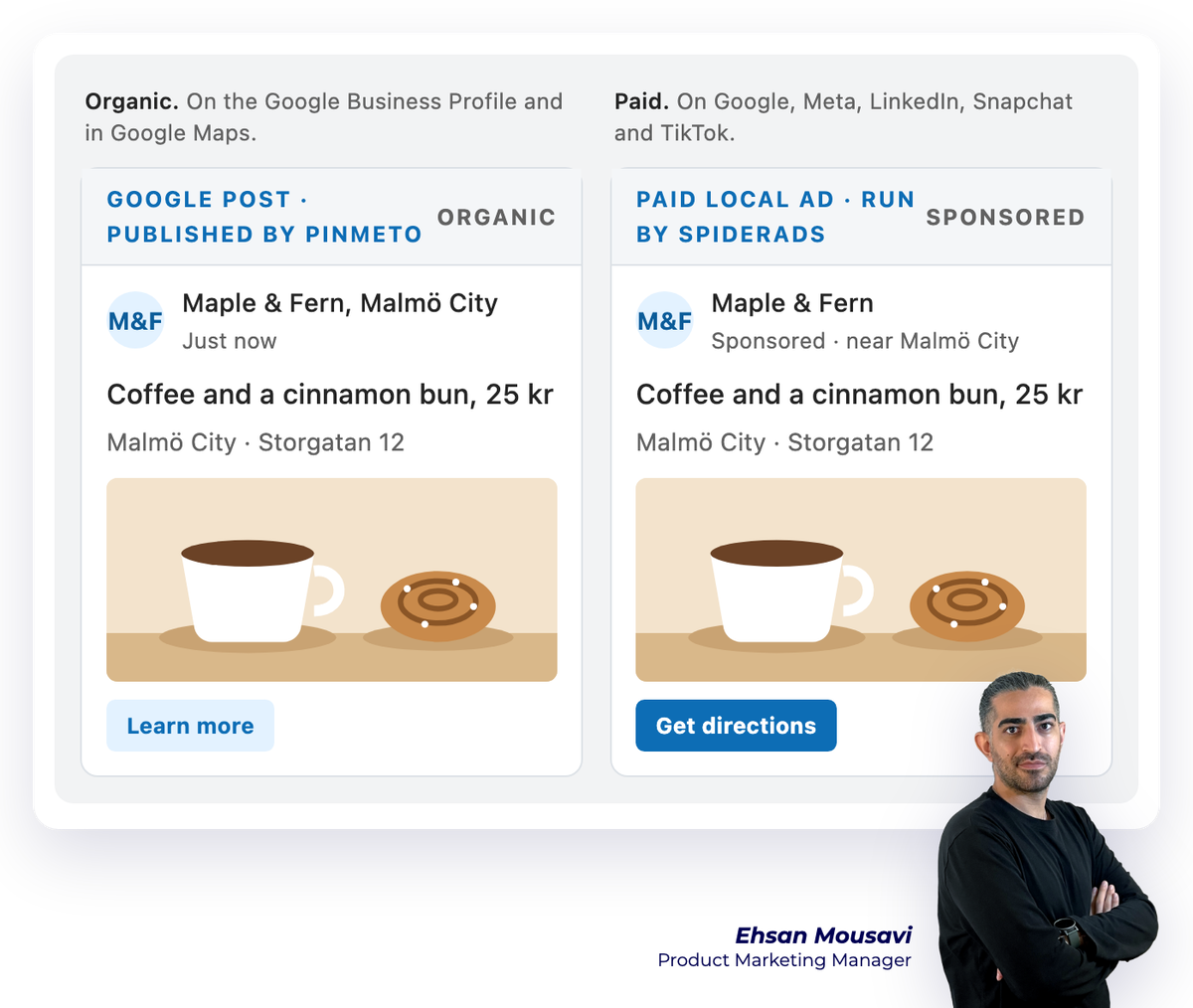
Who does what?
SpiderAds manages the paid advertising: ad creation, spend, bidding and your ad-platform accounts. PinMeTo publishes the organic posts. There is no campaign screen inside PinMeTo, because the integration runs through the API and campaigns are managed in SpiderAds.
Two PinMeTo products are involved, and they do different jobs. Posts publishes the organic content, which through this integration means Google Posts. Listings keeps each location’s information, such as hours, address and phone number, correct on your connected networks, so the page an ad sends someone to has the right details.
Always On or On Demand?
Always On suits ongoing advertising: campaigns run continuously, with no start or end date, and each location gets its own version. On Demand suits a specific promotion or event. It works with your existing ads: SpiderAds prompts you to boost one, and one click expands its reach.
Where do you see results?
The paid side is monitored in SpiderAds in real time: reach, frequency and delivery. The organic posts behave like any other post published through PinMeTo.
What do you need to set it up?
PinMeTo onboarding enables the Location Post module and the API module on your account. Posts has to be in your plan. You then create a dedicated set of Posts API credentials under Account Settings, API, and share them with SpiderAds yourself, securely. A separate set is worth having even if you already use the API, because it keeps the integration isolated. PinMeTo staff never share your credentials for you.
Where to start
Take the next offer you were going to post anyway and run it through both channels. Ask your PinMeTo contact to enable the two modules, create the credentials, and set up the campaign with SpiderAds. If the offer is a single promotion, On Demand is the mode built for it.
Availability
Talk to your PinMeTo contact about access. Needs Posts in your plan, the Location Post and API modules on your account, and a SpiderAds account for the paid side.

Product Marketing Manager
Ehsan is the Product Marketing Manager at PinMeTo. He has spent his career in product strategy and go-to-market across SaaS and AI companies, leading launches and growth marketing that tie new features to real customer needs. At PinMeTo he writes about product releases, new features, and platform updates, covering what's changing and how multi-location brands can put it to work.
Frequently Asked Questions
Who runs the paid ads, PinMeTo or SpiderAds?
Which networks does the organic side reach?
What do we need to set it up?
What is the difference between Always On and On Demand?
Where does the ad content come from?
Is there a Local Campaigns screen in PinMeTo?
Subscribe to Our Newsletter
Get local SEO tips, product updates, and marketing insights for multi-location brands delivered to your inbox.
Want to see it on your locations?
See how PinMeTo helps multi-location brands manage listings, reviews, and local search at scale.
Book a Demo